HOW IT WORKS
Four moving parts, and git in the middle
A Gitt One Pages site is made of exactly four things. Three of them are ours and shared by every site; one is yours. This page follows a commit through all four — with the real sources, not a diagram of them.
- The content repository — your GitLab project. Markdown or typed content tags, images, one
pages.config.js, a Dockerfile of a few lines and a three-line CI file. Nonode_modules, no lock file, no build configuration. - The builder image —
builder-wwwfor landing pages orbuilder-docsfor knowledge bases. The engine (Astro 7, Starlight for docs, Tailwind 4, the markdown pipeline) with every dependency installed and locked. Your Dockerfile startsFROMit. - The pipeline — a shared GitLab CI template. It builds your Dockerfile, pushes the resulting image to your project’s registry and rolls it out to a Kubernetes cluster with a certificate. A push to
masteris production; any other branch is a preview on its own address. - The runtime image —
nginxwith the serving rules already inside: pre-compressed files, cache headers, clean URLs, a 404 page and an optional password. The build result is copied in; nothing is configured.
What one push sets in motion
- push to git
- docker build FROM builder
- static site in dist/
- copied into nginx image
- pushed to registry
- rolled out with TLS
1 · THE BUILDER IMAGE
What you inherit by writing FROM
Both builders are stages of one Dockerfile in the engine repository. A stage installs the pnpm workspace with a frozen lock file, copies the engine's sources and runs a smoke build with fixture content — so an image that was published has already built a site once. Your Dockerfile replaces the fixture content and builds again.
builder-wwwLanding pages
- Astro 7 with the MDX integration, Tailwind 4 and the typography plugin
- Sixty content sections — hero, features, steps, pricing, forms, portfolio — the tags your articles are written in
- A palette generator: brandColor in pages.config.js becomes a primary-50…950 scale in OKLCH, with contrast-safe button shades
- Bundled fonts, sitemap, hreflang alternates, Cloudflare Turnstile for the contact form, astro-compressor for gzip
- sharp for images: every picture in images/ is resized and converted to webp at build time
Fixture content is the engine’s own example site; rm -rf src/articles/* in your Dockerfile is what removes it.
builder-docsKnowledge bases
- Astro 7 + Starlight: sidebar from the folder tree, "on this page", previous/next, dark mode, i18n UI
- The same markdown pipeline as www — GitLab-compatible links, math, emoji, alerts, sanitizer
- Pagefind: a full-text index built after astro build and queried in the browser
- PlantUML through a rendering server, Mermaid on the client — like GitLab
- pages-prepare-content: takes the page title from the first # heading so files need no front matter
A docs repository is the content, so the Dockerfile copies the whole repository and then removes its own plumbing from the copy.
The engine's Dockerfile, abridged
Three published targets from one file. The default target — the docs fixture behind nginx — is what the engine's own CI smoke-tests.
FROM node:26-alpine AS dependencies
WORKDIR /src
RUN npm install -g pnpm@10
COPY package.json pnpm-workspace.yaml pnpm-lock.yaml .npmrc ./
COPY packages/markdown-preset/package.json packages/markdown-preset/
COPY apps/docs/package.json apps/docs/
COPY apps/www/package.json apps/www/
RUN pnpm install --frozen-lockfile
COPY . .

# --- docs builder: content repos start FROM this image ---
FROM dependencies AS builder-docs
WORKDIR /src/apps/docs
# smoke-build with fixture content validates the image and warms caches
RUN pnpm run build

# --- www builder: content repos start FROM this image ---
FROM dependencies AS builder-www
WORKDIR /src/apps/www
RUN pnpm run build

# --- runner: content repos COPY their dist into this image ---
FROM nginx:alpine AS nginx-runner
RUN apk add --no-cache openssl
COPY nginx/default.conf.template /etc/nginx/templates/default.conf.template
COPY nginx/docker-entrypoint.d/ /docker-entrypoint.d/
The engine’s CI tags each target with the version from its package.json and moves latest: h.gitt.one/pages/engine-astro/builder-www:0.24.3 and …:latest are the same image today. The image paths are a public contract — they do not move.
2 · THE CONTENT REPOSITORY
The Dockerfile, line by line
Two stages. The builder stage starts from the engine image, replaces the example content with yours and builds. The runtime stage takes the result into the nginx image. Everything a site can change is either content or pages.config.js.
Landing page
articles/ holds one folder per page with index.<locale>.mdx inside; images/ are optimized by the build; assets/ are served as they are (PDFs, downloads).
FROM h.gitt.one/pages/engine-astro/builder-www:latest AS builder

RUN rm -rf src/articles/* src/images/* public/assets
COPY articles/ src/articles/
COPY images/ src/images/
COPY assets/ public/assets/
COPY pages.config.js ./
RUN pnpm run build

FROM h.gitt.one/pages/engine-astro/nginx:latest AS runner
COPY --from=builder /src/apps/www/dist /usr/share/nginx/html
rm -rf clears the fixture site. COPY pages.config.js ./ is the only configuration: title, contacts, brand colour, languages, menu. pnpm run build is the engine’s script, described below.
Knowledge base
The repository is copied whole into Starlight's content folder: folders become sidebar sections, README.md becomes the front page.
FROM h.gitt.one/pages/engine-astro/builder-docs:latest AS builder

RUN rm -rf src/content/docs/* public/assets
COPY . src/content/docs/
COPY pages.config.js ./
RUN rm -rf src/content/docs/.git src/content/docs/.gitlab-ci.yml \
    src/content/docs/.gitignore src/content/docs/Dockerfile \
    src/content/docs/docker-compose.yml src/content/docs/pages.config.js
RUN pnpm run build

FROM h.gitt.one/pages/engine-astro/nginx:latest AS runner
COPY --from=builder /src/apps/docs/dist /usr/share/nginx/html
The second rm -rf removes the repository’s own plumbing from the copy — otherwise the Dockerfile would become a page of the site.
What pnpm run build actually runs
The build script lives in the engine, so every site runs the same steps. For a landing page it is four commands; a knowledge base swaps the palette for locale preparation and adds the search index.
generate-palette
Reads brandColor from pages.config.js, converts it to OKLCH and writes primary-50…950 plus an analogous primary-alt scale into a CSS @theme block. No brandColor — the engine's default palette stays.
generate-typography
fontFamily, fontScale and headingScale from the config become a CSS type scale; a bundled family is self-hosted, an arbitrary stack is used as is.
prepare-content
Walks the content folder: a page without front matter gets its title from the first # heading; dead relative images are neutralized so a typo renders a broken picture, as in GitLab, instead of failing the build.
astro build
Markdown → HTML through the GitLab-compatible pipeline, MDX tags → sections, images → responsive webp, Shiki code highlighting, sitemap-index.xml, robots.txt, hreflang alternates, the 404 page.
pagefind (docs)
After the build Starlight indexes every page into dist/pagefind/ — chunks that the browser fetches on demand, so search needs no server and works behind basic auth.
astro-compressor
Last integration in the chain: every text file in dist/ gets a .gz twin, so nginx serves compressed files without compressing anything at request time.
MARKDOWN = GITLAB
One pipeline, audited against GitLab's own renderer
GitLab's file view is the content editor, so what it shows is the contract. The engine keeps a fixture file rendered by GitLab and by both builders, and the markdown preset is tuned until they agree — construct by construct.
The shared preset is a small package in the engine. On top of Astro’s defaults (GitHub-flavored markdown and Shiki) it adds exactly what GitLab does differently from a plain renderer:
// - GitLab links: `page.md` → `/page`, `README.md` → `/`, `assets/…` → `/assets/…`
// - GitLab math: $`…`$ and ```math → server-side SVG (rehype-mathjax, no CSS,
//   no fonts — Lighthouse stays at 100). Plain `$…$` / `$$` are NOT math:
//   GitLab 15.5 prints them literally, so does the site.
// - emoji shortcodes `:rocket:` → 🚀 (remark-emoji, gemoji names = GitLab's)
// - raw HTML: what GitLab's sanitizer removes, the site removes (rehype-gitlab-html)
// - task-list checkboxes get an accessible name (rehype-task-list-labels)
// - alerts `> [!note]` — the forward-compatible admonition syntax

const remarkCommon = [remarkGitlabLinks, remarkGitlabMath, remarkEmoji, remarkAlertMarkerCase];
const rehypeCommon = [[rehypeRaw, { passThrough: MDX_NODES }], rehypeGitlabHtml, rehypeMathjax, rehypeTaskListLabels];

export const docsMarkdownConfig = {
  remarkPlugins: [...remarkCommon, [remarkGithubAdmonitionsToDirectives, { mapping: STARLIGHT_ASIDES }]],
  rehypePlugins: rehypeCommon,
};
The consequences for an author: links between .md files keep working after publishing, README.md is the front page, files under assets/ are downloadable from the site, a heading’s anchor is the same slug GitLab makes, and HTML that GitLab strips — <script>, <iframe>, inline style — is stripped on the site too. The full table of what is identical, what differs and what is unsupported is in the documentation.
3 · THE PIPELINE
From a push to a running pod
The content repository's CI file includes two shared templates. They are the same for every site — a landing page and a knowledge base deploy identically — so nothing in the repository knows about Kubernetes.
include:
  - project: 'commons/ci'
    file: 'simpledeploy-master.yml'
  - project: 'commons/ci'
file: 'simpledeploy-branch.yml'version: '3.5'
services:
router:
image: h.gitt.one/${CI_PROJECT_PATH}:${CI_COMMIT_SHORT_SHA:-latest}
build: .
environment:
BASIC_AUTH_HTPASSWD: ${BASIC_AUTH_HTPASSWD}
ports:
- "80:80"The compose file is the whole deployment description. image: names where the pipeline pushes the result — the project’s own container registry, tagged with the commit’s short SHA — and build: . points at the Dockerfile above. The shared template, abridged:
build_container:
  stage: build
  script:
    - docker-compose build      # your Dockerfile, FROM the builder image
    - docker-compose push       # → h.gitt.one/<project>:<short sha>
  only: [master, main]

deploy_master:
  stage: deploy
  variables:
    NAMESPACE: master
    VHOST: ${HOST}
  script:
    - /usr/local/bin/simpledeploy
  environment:
    name: master
    url: https://${HOST}
  only: [master, main]
simpledeploy converts the compose file into Kubernetes resources — a Deployment, a Service and an Ingress for HOST with a certificate from Let’s Encrypt — and applies them to the cluster named by K8S_CLUSTER. Kubernetes pulls the new tag and swaps the pod; the previous one keeps serving until the new one is ready. Two things follow from the tag being the commit SHA:
- Re-running an old pipeline does not redeploy. It rebuilds the same tag; a Deployment whose image tag did not change does not roll. A new commit is what rolls the site — including an empty one, when the point is to pick up a newer engine.
HOSTmust exist before the first pipeline. Without it the build still succeeds and the image is still pushed, but the deploy starts a pod with no Ingress — and is green about it.
The branch template does the same for every other branch, with the namespace and the host derived from the branch name: pr-pricing on www.example.com becomes pr-pricing.www.example.com, with its own certificate, and a manual undeploy job removes it.
deploy_feature:
  stage: deploy
  variables:
    NAMESPACE: ${CI_COMMIT_REF_SLUG}
  before_script:
    - export VHOST="${CI_COMMIT_REF_SLUG}.${HOST%%,*}"
  script:
    - /usr/local/bin/simpledeploy
  environment:
    name: feature/$CI_COMMIT_REF_SLUG
    url: https://${CI_COMMIT_REF_SLUG}.${HOST}
    on_stop: undeploy
  only: [/^pr-.*/, dev]
4 · THE RUNTIME IMAGE
nginx with the rules already inside
The runtime stage of every site is the engine's nginx image — nginx:alpine plus one config template and one entrypoint script. A content repository carries no nginx configuration, which is why every site serves identically.
server {
    listen 80;
    gzip on;
    gzip_static on;                # serve the .gz twins made by the build

    root /usr/share/nginx/html;
    index index.html;

    # intranet mode: `off` unless BASIC_AUTH_HTPASSWD is set — declared at
    # server level so every location inherits it, /_astro/ included
    auth_basic ${PAGES_AUTH_REALM};
    auth_basic_user_file /etc/nginx/auth.htpasswd;

    error_page 404 /404.html;

    # hashed assets are immutable; html must always be revalidated
    location /_astro/ { add_header Cache-Control "public, max-age=31536000, immutable"; }
    location ~* \.html$ { add_header Cache-Control "public, max-age=0, must-revalidate"; }

    # search index chunks are pre-compressed and hashed; loaders are not
    location ~* /pagefind/.*\.(pf_index|pf_fragment|pf_meta)$ {
      gzip off;
      add_header Cache-Control "public, max-age=31536000, immutable";
    }

    # /page answers directly, as Astro publishes it and as the sitemap says
    location / { try_files $uri $uri/index.html =404; }
}
Four decisions live here. Pre-compressed delivery: the build made .gz files, nginx just picks them. Cache correctness: files under /_astro/ carry a content hash in their name and are cached forever; HTML is revalidated on every request, so a deploy is visible immediately. Clean URLs: /page serves /page/index.html without a redirect, so the canonical address matches the sitemap. Real 404s: an unknown path answers 404 with the site’s own page, not a soft redirect to the front page.
The password is the fifth, and it is decided at container start rather than at build time:
if [ -n "${BASIC_AUTH_HTPASSWD:-}" ]; then
    echo "admin:$(openssl passwd -apr1 "$BASIC_AUTH_HTPASSWD")" > /etc/nginx/auth.htpasswd
    export PAGES_AUTH_REALM='"Restricted"'
else
    export PAGES_AUTH_REALM=off
fi
The CI variable BASIC_AUTH_HTPASSWD reaches the container through the compose file’s environment:. If it is set, the password is hashed on start and the whole site — pages, assets, search index — asks for it; if it is empty, auth_basic off is rendered and the site is public. The same image serves both cases, and the plaintext never lands in an image layer.
ON TOP OF GIT
Previews and the site editor
Nothing above knows about the AI site editor, and that is the point: the editor is a git client with a chat in front. It works on a permanent, protected dev branch; the branch pipeline deploys it to dev.<host>; publishing is a merge request from dev to master that the editor opens and accepts for you.
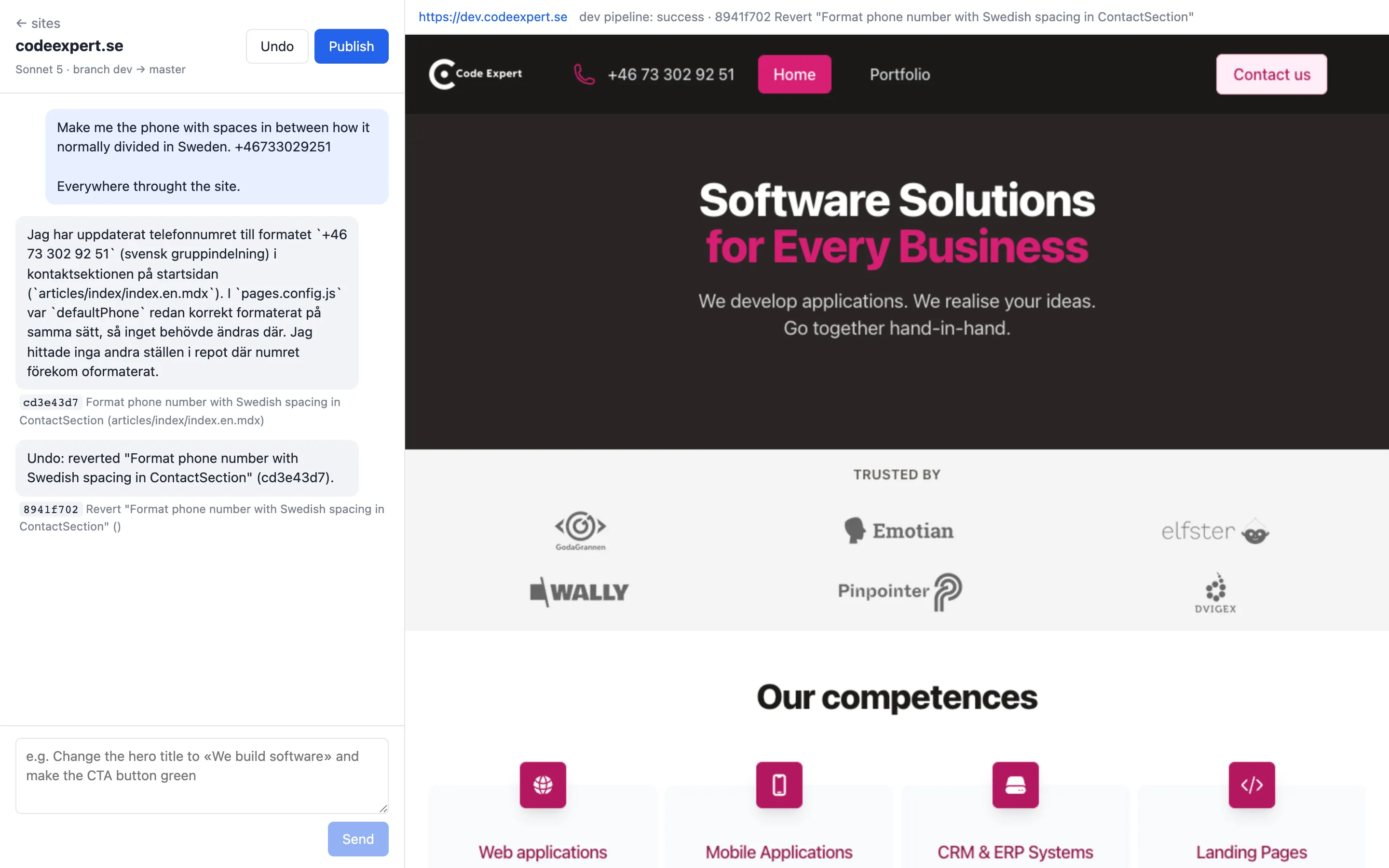
Every request is a commit
The agent reads and writes files in the repository through the GitLab API; each write is a commit on dev with a readable message. The chat shows the commit hashes next to the answers.
Preview is the branch pipeline
The dev branch is in the pipeline's only: list, so a commit there builds and rolls a replica on dev.<host>. The editor polls the pipeline and shows the page when it is up.
Publish is a merge, Undo is a revert
Publish opens a merge request dev → master and accepts it once GitLab reports it mergeable; the master pipeline does the rest. Undo reverts the last commit ahead of master. Before each turn main is merged into dev, so the agent always edits current content.
Your token, your project
The editor acts with the user's own GitLab token. A site created from a description lands in the user's namespace as an ordinary project; a developer can clone it at any moment.
Creating a site from a description
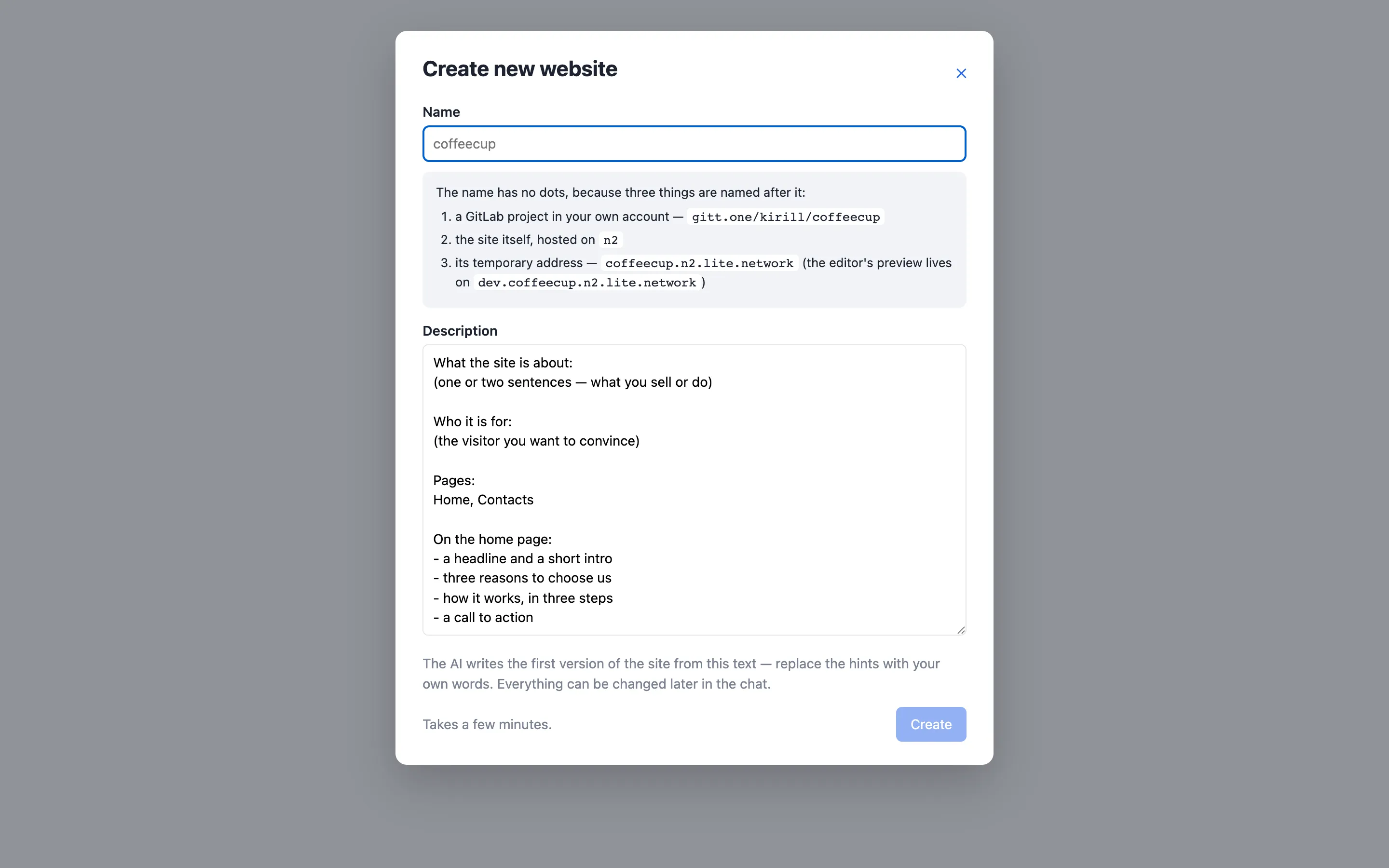
«Create new website» runs seven steps in the background, each one an ordinary GitLab operation. The name has no dots because one word names the project, the site and its host; the *.n2.lite.network zone resolves at any depth, so no DNS record is needed for the site or its preview.
- project — a GitLab project is created in the user’s namespace with the user’s token.
- template — every file of the landing-page template is committed into it as a copy, not a fork, so the site is not tied to the template. The commit is marked
[skip ci]: building the untouched template would be a wasted deploy. - configure —
HOSTandK8S_CLUSTERare set as protected CI variables, the deploy token for the registry is created,devandpr-*are protected. This happens before any pipeline, because a pipeline that starts withoutHOSTdeploys an ingress with an empty host. - content — the same agent that later edits the site writes its first version on
masterfrom the description. Its commits trigger the first real pipeline. The description and the answer are stored as chat, so the editor opens on a conversation that already happened. - dev — the preview branch is created from
master, which starts the preview pipeline. - ci — the run waits for both pipelines to finish.
- https — the run requests the site and the preview over a verified TLS connection until both answer 200; before Let’s Encrypt issues the certificate the ingress answers with a self-signed one, which is exactly what verification rejects.
Then the site is activated in the user’s list. A failed run leaves the project in place and says which step stopped and why.
Questions engineers ask
Short answers; the setup details are in the documentation.
How do I get a newer engine into my site?
The Dockerfile starts FROM builder-www:latest, so any build picks up the current engine — but only a new commit builds and rolls. When nothing in the content needs changing:
git commit --allow-empty -m "Rebuild on the current engine"
git push
Pin a version instead of latest if you would rather move deliberately: the tags are the engine’s package.json versions.
Can the image run outside your clusters?
Yes — it is an ordinary nginx image. docker run -p 8080:80 h.gitt.one/<your project>:<tag> on any Docker host serves the site; set BASIC_AUTH_HTPASSWD in the environment to put it behind a password. The build works anywhere too: docker build -t mysite . in the repository needs only access to the engine’s registry.
Why is there no node_modules or lock file in my repository?
Because the dependencies are inside the builder image, with a frozen lock file the engine maintains. Your repository cannot drift: two builds from the same commit and the same engine tag produce the same site. It also means a content repository has nothing to update — the engine is updated in one place, and sites pick it up on their next commit.
How much JavaScript does a page ship?
None by default: Astro renders sections to plain HTML and ships no framework runtime. Interactive pieces are small islands — the contact form is about a kilobyte, Mermaid is loaded only on pages that contain a diagram, the search UI only in knowledge bases. That is what makes Lighthouse 100 a target rather than a hope.
What exactly leaves with me if I leave?
The repository: content in Markdown/MDX you can read without our engine, and the images. The last built image: a static site inside nginx, runnable anywhere. And the engine itself is Astro, MIT-licensed — the largest content-framework ecosystem — so a new team continues it as an Astro project or moves the data into a CMS of their choice.